Scriptable CAD with Lua.
Write parametric 2D and 3D models in Lua
and export them to 3MF, STL, OBJ, PLY, OFF, AMF, or SCAD,
or render them straight to a PNG.
Existing OpenSCAD files open too — LuaCAD evaluates the
.scad language itself, with no OpenSCAD installation
involved.
Try it in the playground — the engine runs in the browser as WebAssembly, so there is nothing to install and nothing gets uploaded.
LuaCAD embeds Lua 5.4 in a Rust engine that evaluates CSG operations directly (via Manifold) or generates OpenSCAD code for external rendering.
Why Lua?
- Similar syntax as the OpenSCAD language, but better:
- More powerful
- More consistent
- Faster
- Easily embeddable
- Operator overloading for natural CSG syntax
(
a + b,a - b,a * b) - Already used in other CAD software like LibreCAD and Autodesk Netfabb
Example
LuaCAD:
my_cube = cube { size = { 1, 2, 3 } }

function my_sphere(radius)
  return sphere({ r = radius }):translate(5, 0, 0)
end

model = my_cube + my_sphere(2)

render(model)
Equivalent OpenSCAD:
module my_cube() {
  cube(size=[1,2,3]);
}

module my_sphere(radius) {
  translate([5,0,0]) sphere(r = radius);
}

union() {
  my_cube();
  my_sphere(2);
}
Getting Started
Homebrew installs the prebuilt luacad and
luacad-studio binaries, so nothing has to be compiled:
brew install ad-si/tap/luacadOr from crates.io:
cargo install luacad         # CLI for running and converting LuaCAD scripts
cargo install luacad-studio  # GUI desktop app with live 3D preview
Or from source, which requires Rust:
git clone https://github.com/ad-si/LuaCAD.git
cd LuaCAD
make install
Both crates vendor their C/C++ dependencies, so no system libraries need
to be installed — but a C++ compiler and CMake must be available to
build Manifold and Clipper2. On Linux, luacad-studio
additionally needs the windowing headers (on Debian/Ubuntu:
libx11-dev, libxcb1-dev,
libxkbcommon-dev, libxrandr-dev,
libwayland-dev).
CLI Usage
luacad convert model.lua output.3mf   # Convert to 3MF
luacad convert model.lua output.stl   # Convert to STL
luacad convert model.lua output.scad  # Export as OpenSCAD
luacad watch model.lua output.3mf     # Rebuild on file changes
luacad render model.lua preview.png   # Render to a PNG image
luacad info model.lua                 # Print triangle counts and bounding box
luacad lint model.lua                 # Lint with selene (also takes directories)
luacad run model.lua                  # Execute (side-effects only)
convert and watch infer the format from the
output extension; --format <fmt> overrides it, and
--via-openscad hands the export to an installed OpenSCAD
binary instead of building the mesh with Manifold.
Every subcommand takes a .scad file wherever it takes a
.lua one — see
Opening OpenSCAD Files below.
Studio
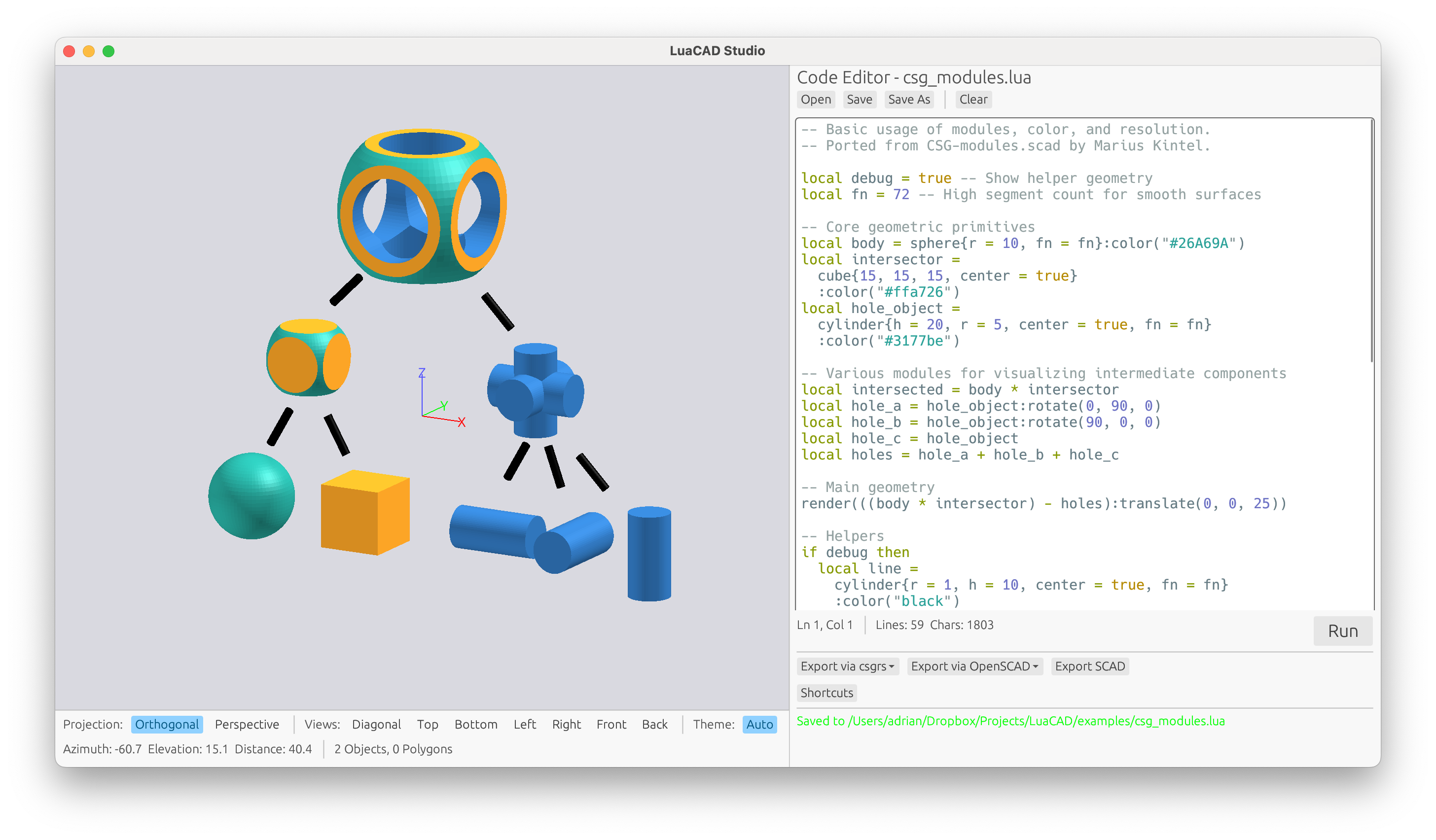
luacad-studio is a desktop app with a code editor and a
3D viewport: edit the script on the right, watch the model update on
the left. The viewport draws the CSG tree itself through
WebCSG on
wgpu, so a boolean shows up as soon as
the script runs, without waiting for a mesh to be built for it.
A file changed by another program is picked up automatically, and the
Raytrace button path-traces whatever the viewport is currently showing.
Rendering
luacad render rasterizes a model to a PNG, shading flat
so the tessellation stays visible (--smooth turns that
off). --raytrace hands the same scene to a path tracer
instead — soft shadows and ambient occlusion, at a few seconds
per image:
luacad render --raytrace model.lua model.png
luacad render --raytrace --samples 512 model.lua   # less noise, longer render
luacad render --camera 45,20 model.lua             # azimuth,elevation in degrees
Surfaces answer to material(), which the path tracer
reads for reflection, refraction and light emission:
sphere({ r = 10 }):material("gold")
cube({ size = 20 }):material("glass", { ior = 1.5, roughness = 0.1 })
The kinds are matte, plastic,
metal, glass and emissive;
steel, chrome, gold,
copper, brass, rubber,
wood and ivory are presets that bring their
own color.
Opening OpenSCAD Files
A .scad file works anywhere a .lua one does,
on the command line and in Studio. LuaCAD parses and evaluates the
OpenSCAD language itself, so nothing has to be installed and
--via-openscad is not involved:
luacad convert bracket.scad bracket.3mf
luacad render bracket.scad bracket.png
luacad-studio bracket.scad
Both languages produce the same internal tree, so an opened
.scad file reaches every export format, the renderer, the
path tracer and Studio's live preview unchanged, and
luacad convert model.scad out.scad round-trips it with
modules inlined and $fn/$fa/$fs
resolved to facet counts. The
chess example is written this way.
BOSL2
LuaCAD has full support for the Belfry OpenSCAD Library v2, reimplemented in LuaCAD itself, so it renders, previews and exports to a mesh without OpenSCAD or BOSL2 installed:
bosl.cuboid { {40, 40, 40}, rounding = 2 }
bosl.regular_prism { 5, r = 10, h = 25 }
bosl.spur_gear { circ_pitch = 5, teeth = 20, thickness = 5 }
Exporting to .scad still writes the BOSL2 call itself,
which keeps the exported file as short as the script that produced it.
Text and Imports
text() outlines a system font into a sketch and
text3d() extrudes it in one step, so text becomes real
geometry rather than SCAD output:
render(text("LuaCAD", { size = 12, halign = "center" }):linear_extrude(2))import() reads every mesh format LuaCAD writes and returns
a solid you can transform and combine like any primitive; SVG and DXF
return a 2D sketch instead, ready to extrude.
Supported Export Formats
- SCAD - OpenSCAD format
- 3MF - 3D Manufacturing Format
- STL - Standard Triangle Language for 3D printing
- OBJ - Wavefront 3D object format
- PLY - Polygon File Format
- OFF - Object File Format
- AMF - Additive Manufacturing File Format
Every value your script returns becomes its own 3MF object, so slicers
load them as individually movable parts. Label them with
:name(…) to control how they appear in the object list.
The other formats cannot express separate objects, so they flatten
everything into a single mesh.